

Industry guides
TraceClose for info products sold 1:1 on WhatsApp (X1)
In Brazil, “X1” is selling one-on-one in a WhatsApp chat. Apply the Digital products template: stages New lead, In conversation, Call scheduled, Link sent, Purchased and Lost, with the Lead, Contact, Schedule, InitiateCheckout and Purchase events. Closers work the chats in rotation, and every recorded purchase goes back to Meta with the amount, tied to the ad that brought in the lead.
Step by step
Apply the Digital products template
Settings › Segment › Digital products › Use this template. “Salesperson” becomes closer and “meeting” becomes call.
Trim the funnel if you don’t do calls
For low-ticket offers sold right in the chat, archive “Call scheduled” in Settings › Pipeline and keep New lead → In conversation → Link sent → Purchased.
Connect Meta as a conversions destination
In the Meta connection, also check Conversions destination and fill in the pixel ID. For click-to-WhatsApp ads, also fill in the WABA and the dataset.
Put your closers in the rotation
Invite them as Salesperson in Settings › Team and raise the weight of whoever converts best.
The X1 funnel, stage by stage
| Stage | How it moves | CAPI event |
|---|---|---|
| New lead | Entry, on the first message | Lead |
| In conversation | First reply trigger | Contact |
| Call scheduled | Trigger when you use Schedule call | Schedule |
| Link sent | The closer moves it when sending the payment link | InitiateCheckout |
| Purchased | The closer moves it and records the sale with the amount | Purchase |
| Lost | Asks for the reason | — |
What makes the difference in X1 sales is InitiateCheckout on “Link sent”: it teaches Meta who gets close to buying, and you see in the dashboard how many links turned into sales. Each event is sent once per lead and stage, and Purchase is sent with the recorded amount.
Record the sale without friction
The most common path: the customer pays, the closer drags the card to Purchased in the Kanban (or uses Move to…), and TraceClose opens the sale record with Amount, Currency and Sale date. If the closer clicks Record later, the lead is flagged as waiting for the sale; without the record, the win counts, but the revenue and the Purchase with the amount aren’t sent.
Have a developer and a server that receives the payment confirmation from your checkout? It can send the sale to TraceClose through the Site connection, with the buyer’s phone or email: TraceClose finds the lead by phone, moves it to the won stage and records the sale, without duplicating it if the same sale arrives twice. It has to be sent from the server, with the connection secret. See website leads and sales.
Closers, speed and canned replies
- Weighted rotation. Give a higher weight (from 1 to 10) to the closer who closes the most. The mode is in Settings › Operations.
- Short maximum time without a reply. In 1:1 chat sales, a lead goes cold in minutes. Something between 3 and 5 minutes makes the alert show up before you lose the sale.
- Team quick replies for the pitch, objection handling and the payment link, with
{{primeiro_nome}}(first name) and{{vendedor}}(the sender). - Audio. You can record voice messages in the inbox (up to 15 minutes) and listen before sending.
- First to reply takes it. If a closer replies before the lead’s owner, the lead goes to whoever replied (except after a manual reassignment).
Example: Example Coaching
Example Coaching (fictional) sells a $197.00 course 1:1 in chat, with four closers and click-to-WhatsApp ads. In a sample week: $5,000.00 in spend, 400 paid leads, 160 links sent, 60 purchases ($11,820.00). CPL of $12.50, CAC of $83.33, ROAS of 2.36. In Analytics › Campaigns, at the ad level, the “testimonial” video creative had a higher CPL than the carousel but 3x the purchases: that’s the one that got the budget.
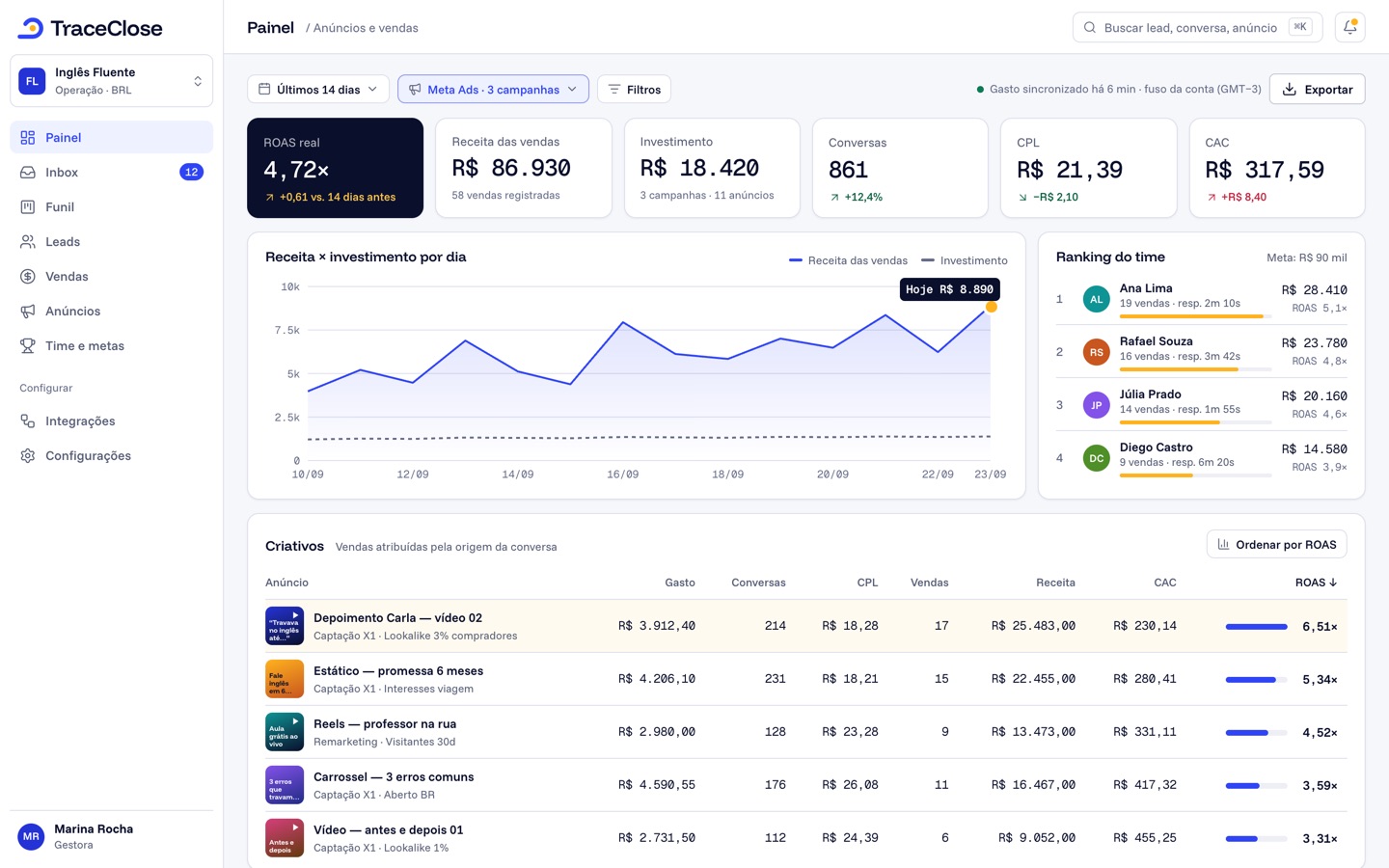
Goals help the team keep the pace: in Analytics › Salespeople, the manager sets monthly wins goals for the team and for each closer, and each closer tracks their own in My numbers. See monthly goals.
Didn’t work? See…
- The purchase doesn’t show up in Events Manager: sale doesn’t show up in Meta.
- How click-to-WhatsApp attribution works: click-to-WhatsApp ad conversions.
- Lead with no ad: conversation with no source.
Frequently asked questions
Can I see which creative drove my WhatsApp chat sales?
Yes. With click-to-WhatsApp ads, the message arrives with the ad; the sale recorded on the lead shows up on that ad’s row in Analytics › Campaigns, with revenue, CAC and ROAS.
Do I need a call in the funnel?
No. Archive the “Call scheduled” stage in Settings › Pipeline if you sell right in the chat.
Do checkout sales come in automatically?
Only if a server of yours sends the sale to TraceClose’s Site connection. Otherwise, the closer records the sale in the lead panel.
See the path from ad to sale in your WhatsApp.
Try TraceClose free for 7 days with your team. No card needed to try.